Our blog has moved!
Please look for all new blog articles at http://www.beanstalkcomputing.com/blog
posted by beanstalk66 @ 4:59 PM
0 comments


Come See Our New Blog!
Our Blog has moved! You should be automatically redirected in 6 seconds. If not, visit
Beanstalk Computing IT Support Blog
and update your bookmarks.
BeanstalkComputing.com and Jason Brooks present the blog for technology news and reviews. Email support@beanstalkcomputing.com if you have any questions!
Please look for all new blog articles at http://www.beanstalkcomputing.com/blog
posted by beanstalk66 @ 4:59 PM
0 comments
I have been getting a lot of spam from known email addresses (friends and associates) lately. Recently, a lot of people’s email/facebook accounts have been hacked into by spammers allowing them to send out spam from their account. If this happens to you make sure to change your password right away and check how secure your password is at HowSecureIsMyPassword.net which will tell you how long it would take to hack your password so you can create a strong password
For more security recommendations and a full security audit of your business computer network contact Beanstalk Computing today!
posted by beanstalk66 @ 2:27 PM
1 comments
Here are a few pages from our trifold brochure
Beanstalk Computing offers to fix your first computer problem at no cost!
posted by beanstalk66 @ 9:30 PM
0 comments
Maximum PC published a great article on how to preserver your hard drive to a virtual image using a new tool from Microsoft called Disk2VHD.
This tool allows you to take any computer running Windows XP or newer on the desktop or Windows 2003 or newer on the server and create a bootable image file you can run virtually within a virtual PC environment. This is very handy if you are upgrading your computer from Windows XP to Windows 7 since there is no direct upgrade path. You create an image of your Windows XP computer first then install Windows 7. After that you can run your old computer as a virtual computer with all settings and programs in tact!
The one caveat is that you must have 127GB of data or less on your boot partition for this process to work correctly. What MaximumPC does not tell you is that even if you have less than 127GB of data, if the partition or hard drive was originally larger than 127GB you will have to use DiskPart and VHDResizer to get it working correctly. The instructions for this can be found here.
posted by beanstalk66 @ 10:58 AM
0 comments
According to the April 2010 issue of Laptop Magazine the best laptop PC brand to purchase is Lenovo!

“Lenovo’s ThinkPad T410s is one of the fasted notebooks we have EVER tested while still remaining highly portable. Not only did Lenovo have a very good year, but things are looking even brighter with the expected arrival of its breathtaking skylight smartbook and innovative U1 Hybrid tablet-notebook.”
The top five notebook brands are:
1. Lenovo
2. Sony
3. Toshiba
4. Asus
5. Dell
At the bottom of the list? HP!
“In addition to having the highest failure rate of any brand (25.6 percent), HP provoked a vitriolic response from our readers, who mostly complained about heat issues; 41 percent graded them as a D or below. One Reader wrote, “HP tech support is truly horrific,” and another said, “HP is probably the worst manufacturer…its hardware and design have always been a huge problem.

posted by beanstalk66 @ 8:40 AM
0 comments
HP: 'We're doubling down on webOS,' Palm: 'That was the whole point'
Wow, good for HP and Palm! I hope this breathes new life into Palm as they really do have a good operating system built on the Palm Pre and Pixi which me and my wife just got. Maybe we will get a WebOS based tablet soon! Read more thanx to engadget here
posted by beanstalk66 @ 6:20 PM
0 comments
Microsoft Office 2010 Release Date – Microsoft has announced that Office 2010 would be available on May 12 for professionals and for the general public in June.In addition, purchasers of Office 2007 on or after March 5 will receive a free upgrade on the product.
The U.S. publisher has also confirmed that the software is free for owners of Office 2007 who have activated their product before September 30. The final version of Office 2010 will be completed next month but the beta is already available on the web here.
posted by beanstalk66 @ 5:35 PM
0 comments
![2010-01-05u1hybridpage[1]](https://blogger.googleusercontent.com/img/b/R29vZ2xl/AVvXsEhnGjru1_xNtXauetxzQXPn8KIyV_0V8AQBv3G_nx-8sATtqhIepF-tmh2tQ96x3mWD-7kQfrgTcCBaKSxLfPTQSZz7v2x8h-mOKZxyEiF4S-Ih8gkIp3JR_NGoPM-aqLKGI2RL/?imgmax=800 "2010-01-05u1hybridpage[1]")
Everyone has heard about the iPad from Apple. How does a notebook and tablet in one sleek ruby red U1 Hybrid from Lenovo IdeaPad sound to you? Actually, it’s about time someone came up with this concept since its impossible to expect a person to go around carrying so much equipment. And so the IdeaPad U1 from Lenovo makes its grand entrance.
To get the general idea of what the specs are, the U1 is equipped with an Intel-Powered Windows 7 OS, AND a Snapdragon-powered linux OS in the tablet. Its LITERALLY two computers in one! It has the Intel CULV processor with 128GB SSD, detachable multi-task 11.6 touch screen display, with 3G, webcam, Wi-Fi, Bluetooth, and speakers.
The tablet part of the system is running the Skylight UI which you can switch to as fast a 3 seconds from the notebook. And it will automatically transfer any websites you are looking at in Windows to the Linux OS on the tablet when you switch back and forth.
The question on everyone’s mind is whether or not this U1 Hybrid will be worth getting. How long is battery life? Plus, does it work - will a notebook and tablet in one device be something people need?
First of all, it has separate battery packs for the notebook and the tablet, which is very convenient. The notebook can be detached and used independently. The notebook and the tablet have their own Wi-Fi antennas, while the tablet has the added advantage of having 3G and Bluetooth. All told, this latest from Lenovo appears to be going in the right direction.
There are also other Lenovo models that are being introduced together with the U1 Hybrid like the Skylight and the IdeaPad S10-3 and IdeaPad S10-3t. Expect it to be released later this year!

posted by beanstalk66 @ 10:58 AM
0 comments

AT&T, notorious for bad service, has come up with a way to boost the 3G experience and bring it into your home. This is through the 3G Microcell which is a $150 device that’s easy to use, capable of you with providing 5 bar speedy connections and wireless service inside your home for voice and data on your 3G phone. ATT Offers a $100 rebate if you sign up for a monthly plan.
You can optionally subscribe to a plan with a monthly fee of $19.99, which will give you unlimited phone calls on your cell phone through your 3G MicroCell.
I have recently purchased this device for my home, and I can now use my cell phone freely througout the house, before I had NO signal as I was in a dead zone!
Unfortunately, if you have too many walls, then you will experience dropped calls and a weak signal. Still, The 3G MicroCell is a unique gadget to have in the house because it will work even when the weather’s bad, so you don’t have to rely on cell towers all the time.
With 3G technology, you have quicker access that will make it possible to multi-task in areas long before considered as dead zones. AT&T uses High Speed DPA/UM Telephone System which makes it possible to move around your home without signal interruption. Internet and iPhone mobile use becomes possible at the same time. Of course, you will need to check if you have 3G coverage in the area first, and if it has a direct line to your home without being blocked by anything concrete like trees or solid walls.
posted by beanstalk66 @ 11:24 AM
0 comments

For Technical Support with removing and wiping your data from your hard drives, contact Beanstalk Computing at 800-813-0926 BEFORE bringing in to Best Buy.
Known for the place to go when buying electronics, Best Buy has now launched another concept called Greener Together™ that’s probably going to make them smell a lot like roses.
A green world is what we should all be striving for and if you have no where else to go to get rid of old gadgets, then try any U.S. Best Buy store. They’re willing to get them off your hands and see that they get disposed off properly. Your mobile phone, keyboard, mouse, or junk TV could even end up recycled as new-fangled device.
There’s a catch - of course. Strictly only 2 items a day will be accepted. In other words, don’t bring a truckload of junk radios and TVs to Best Buy stores. Nothing with Freon, hard drives, TVs with screens bigger than 32 in., and home appliances like microwaves will be accepted. Computers with hard drives still installed will be charged a removal fee of $19.99, so make sure to dispose of your hard drives properly.
For non-Best Buy brand TVs, or anything with a screen smaller than 32’’ a fee of $10 will be charged. In exchange, you will get a $10 Best Buy gift check. This particular requirement has other limitations, check with the nearest Best Buy store for more details.
And lastly, you might be interested to know that Best buy will not do the recycling themselves. They’ve tied up with some of the country’s best recycling companies who will receive these items, who will see how they can be re-used or recycled, or disposed of with minimal harm to Planet Earth.
posted by beanstalk66 @ 3:13 PM
0 comments
I just love being able to walk through my house and listen to the same music in every room, perfectly synchronized and sounding great. This is why Sony has introduced the new Sony Altus Multi-Room Music System that you can hook up to your PC or iPod/iPhone. With this kind of audio system, you don’t even need an expensive audio system. The music transmits wirelessly from your PC or iPod/iPhone up to eight rooms in your home or office.
As expected, the sound quality is Sony - superb and crystal clear. Without the annoying cords and wires, you can walk from room to room, enjoying your favorite tunes without worrying about how to set up your system, or trip over wires. This wireless PC transmitter is a simple USB dongle, which means no worries, no stress.
If you’re worried about how to set it up, don’t be. Beanstalk Computing can schedule someone to go in and professionally install the whole system for you. All you need to do is set an appointment and be there when the doorbell rings.
Now you can stream tunes from your play list and music channels straightaway, and have the luxury of Sony’s optional 8 S-Air speakers which you can add to your system.
The best part about this is that you know Sony is quality. It has a reputation that spans years of expertise and crosses borders to provide personalized service as well as quality sound.

posted by beanstalk66 @ 3:54 PM
0 comments
Beanstalk Computing came into this environment and things were a mess. Not only was there no backups being made of their main database, it was running on a single hard drive! Also, as you can see in the first picture below, the server room was unprofessional and finding a cable was impossible as nothing was labeled correctly.
With our help they have condensed their server room into a nice neat rack mount solution with cables neatly organized and easy to find! No more hunting down which cable goes where!


posted by beanstalk66 @ 5:12 PM
1 comments

The launch of the Thermaltake Level 10 Chassis upon us. This is one of the most unique computer cases to hit the market since the Antec Skeleton, the case I am using now. 
Level 10 is a collaboration between Thermaltake and BMW DesignWorks. It’s innovative and decidedly unique concept will thrill enthusiasts that will knock all other cases out of the game.
This giant chassis measures 12.5 inches x 2 feet x 26.2 inches, and is pretty heavy at 47 pounds. It’s got a central pillar and individual compartments for power supply, hard drives, and optical drives. You can do so much with this chassis, it’s unbelievable!
The design engineers took into consideration the fact that enthusiasts will work and play non-stop and this is why every compartment is individually ventilated. With big panels covering the removable motherboard, GPUs, and PCI-E cards, you now have easier access to all your components. It also has 6 slots for hot-swap SATA hard drives with a cool red LED, mounted on 2.5 and 3.5 inch drives. You will find the precious optical drives at the top right corner and the power supply on the opposite side.
The red LED strip crosses the top and rear sides, with red LED exhaust and intake fans along the motherboard panels. Hooking up your cables will not be a problem because of easy access in the rear.
A $700 chassis is a very steep a price to pay, and since this is a new concept in casing, it’s now a wait and see if everything will really pull together to change the landscape of gaming for hardcore enthusiasts.
Read more at MaximumPC.com
posted by beanstalk66 @ 10:51 AM
0 comments
No computer system that goes online can be without an anti-virus application. Luckily, there are anti-virus applications that you can download free. Here are two of the latest ones released.
Note that in a business environment Beanstalk Computing recommends a more professional antivirus solution. This is for personal use only.
Published by AVG Technologies just this 11th of November, AVG Free 9 will work on Windows 2000, XP, Vista, and Windows 7. It has been optimized to use less memory and slow down your computer much less than previous versions, and is trusted by many users as they are already in their ninth version.
AVG 9 also has new features such as anti-phishing and screening websites that you visit. Furthermore, it comes with a convenient safety ranking ratings for search engines which can save you a lot of time.
Looking at the new free anti-virus of Microsoft, Microsoft Security Essentials (MSE) Version 1.0, you might be even more impressed. It works best on Windows XP, Vista, and Windows 7.
Trying MSE, you will notice that it is has a simple, clear graphic interface that is very user-friendly. It comes with a green/red taskbar icon that quickly lets you know the status of antivirus quickly and easily.
For a free anti-virus software, MSE is surprisingly adept at what it does, and out chases AVG 9 as far as its friendly interface is concerned. Of course, AVG 9 has one solid wall to lean on: Its trust and history with users which can be hard to compete with.
posted by beanstalk66 @ 10:39 AM
0 comments
Manufactured by the makers of UltraLast Green Batteries, the Lunar Charger really looks like something from out of this world. It even comes with an intriguing green night light that pulses while charging.
You can charge all your AA or AAA green batteries quickly and efficiently. Measuring a mere 7 inches by 4.2 inches by 4.2 inches, and weighing a mere 8 ounces, this is one charger that is a handy carry-on wherever you go.
It even comes with 4 AA UltraLast Green batteries that have been pre-charged, which means you’re all set from the get-go. You can pick this up from Amazon or many other locations.
It’s all about being green, and as far as environmental concerns and saving the earth is concerned, you can do no better than this charger. Not only will your batteries hold their charge for up to 6 months, if you don’t use them for up to a year, you still can get at least 80% charge. What’s more, you get to charge over and over again up to 500 times, or the equivalent of 3 years.
With just one UltraLast battery, you get to save the earth from having to deal with a thousand regular alkaline batteries. At $29.99, you even get a 3 year Limited Warranty.
Ultralast Green is one of Beanstalk Computings Premier clients. We have helped manage their IT needs for the last two years.
posted by beanstalk66 @ 11:41 AM
1 comments
Android is the an OS created by Google, running on the Linux open source kernel. Today, it’s causing quite a stir with the launch of the droid phone from Verizon.
Let Beanstalk Computing help your San Diego Small Business setup Exchange Activesync on your new smartphone!
The Motorola droid phone from Verizon is being touted as the answer to the iphone on Verizon, finally a descent smartphone from Verizon! The Xperia X10 released by Sony is another player in the field trying to wrangle a share of the huge mobile phone market. Can the droids really knock out the iPhone? Probably not, but it will but another nail in the coffin for Windows Mobile.
Let’s look at what Verizon can offer: a bigger screen, better resolution, keyboard and touch screen, better cell signal, and multitasking. But let’s compare this to the iPhone....
The iPhone is lighter, more stylish, has a ton of apps, music and video synching, accessories, and design. Of course, it’s got a huge customer base already who are very happy with their iPhone.
Now let’s look at the Sony. Xperia X10 only uses the Android 1.6, unlike the Verizon’s 2.0 and this means it misses out on the new features that the updated Android OS offers. However, the Droid only has 5 mega-pixel while the Xperia X10 boasts of 16x zoom, and a mega-pixel of 8.1 with video recording. The Xperia X10, which was called originally Rachael, won’t be out until early 2010.
Do we go with the new droid phones, or will the iPhone still be the leader of the pack? Hard to say right now, but definitely, droids are here to stay, and that can only mean better mobile communications for everyone!


posted by beanstalk66 @ 12:40 PM
1 comments

Microsoft just launched their Windows Mobile 6.5 Family, dubbed Windows Phone. Featuring the next generation phones, with easier usability, browser enhancements, and a new user interface.
Using Windows Mobile 6.5 as the software, several top phone companies have banded together with Microsoft to create an amazing line-up. Let’s see what these phones can offer that’s different.
AT&T has released the Tilt 2 by HTC, also available as the HTC Touch Pro 2 by Verizon which is designed to attract business-minded people with its TouchFLO 3D mode and QWERTY keyboard. Even more important is the focus of this phone to provide professionals with an interactive venue for conference calls with a high quality speakerphone.
AT&T’s HTC Pure which is an offshoot of Diamond 2, without the heavy design, is now a sleek, glossy mobile with an autofocus 3.5 megapixel camera, and a 3.2 inch screen.
Verizon matches AT&T with its HTC Imagio which is essentially an upgrade from the Touch Diamond 2. It allows you to customize the phone according to your needs; has a bigger screen, GSM and CDMA with 3G, and the FLO TV tuner. Stream music, sports, news, movies, and even stock market reports with Imagio, and experience the freedom of mobility.
Samsung’s Intrepid which is being retailed for the same price as the Pure is an upgrade of the OMNIA Pro, available from Sprint.
Comparing Windows 6.5 to the older 6.1, the entire experience is upgraded. But it seems like a minor upgrade from 6.1 and still does not compete with the iPhone in the overall user experience, although the new Windows Marketplace is a step in the right direction to compete with the app store. One reason to buy it is the Exchange ActiveSync technology is a cut above the rest, but on the other hand, why not just wait for Windows Mobile 7.0?
posted by beanstalk66 @ 12:05 PM
0 comments
Tired of wrist, hand, back, and shoulder injuries because of constant computer use? If you are on your computer daily for hours on end, then you may have to worry about Carpal Syndrome. Carpal Syndrome is pain caused by repetitive action like typing, sitting hunched over a PC, or just clicking away at the keyboard.
Come December, you can say goodbye to Carpal Syndrome with the new ErgoMotion™ keyboard and mouse from Smartfish. These products will be the first intelligent no-injury computer devices ever introduced, conceptualized and created by Dr. Jack Atzmon in collaboration with New York’s Hospital for Special Surgery.
Not only are they stylish and sleek, this Smartfish mouse has an ambidextrous design so that your wrist is never at an awkward position. The Smartfish keyboard has a patented system that stdies your pattern and makes adjustments to the height, angle and radial position of the device. Your wrist is the top priority with this keyboard, and will even follow your use pattern automatically.
To be sold for only $129.99 for the ErgoMotion™ Keyboard and $49.99 for the ErgoMotion™ Mouse, with 5 year warranty, is compatible with Windows Vista and XP, Smartfish has outgunned all other keyboards and mouse products in one go.

posted by beanstalk66 @ 12:14 PM
0 comments
If you have been looking for a device that will allow you to do online work just about anywhere, then the MiFi is for you. This is a handy credit-card size Wifi access point that works extremely fast, and can accommodate up to 5 different devices.
Touted to be the world’s first ever Intelligent Mobile Hotspot for CDMA from Novatel. The MiFi 2200 has a rechargeable Lithium Ion battery capacity of up to 4 hours in full capacity if being used on one device only, and has up to a 30 foot range. It is also GPS enabled and carries an advanced antenna system.
How can you get connected? You can choose Sprint’s MiFi package which includes a $99.99 deal for the MiFi card, provided you avail of the mail in rebate of $50. Then you have pay $59.99 a month for the subscription.
Verizon, on the other hand has several choices starting with a plan that does not even require a subscription. But you have to pay full price of $269.99 for the MiFi package. You can choice from a $15 day pass, a $39.99 250MB monthly rate, or a 5GB package with a monthly rate of $59.99.
posted by beanstalk66 @ 10:58 AM
0 comments

Forget about Vista! At least that’s what Microsoft wants you to do. They have brought out Windows 7 very quickly, and mainly to wash away the bad taste of Vista, yuk! Beanstalk Computing is recommending that their clients either stick with Windows XP or wait until Windows 7 is released on October 22nd. Note that if you buy a computer now with Vista you will get an upgrade to 7 free!
Versions:
What version of Windows 7 should you get? According to SuperSite the choice will come down to two or, at most, three choices, Windows 7 Home Premium, which is aimed at consumers, Windows 7 Pro, which adds some business-oriented features, and Windows 7 Ultimate, the “uber” version of Windows 7.
Most consumers should go for Home Premium. It’s priced right, it includes the features that consumers want, and it’s not missing any major functionality.
In the business world, Beanstalk Computing recommends Windows 7 Professional. It includes support for Active Directory based domains. You also gain access to Windows XP Mode, a virtual fully licensed copy of Windows XP, so you are guaranteed that ALL legacy software will work! Its like two operating systems in one! Some other features include support for 192GB of RAM, automated network backups, remote desktop, offline file support, and presentation mode.
Windows 7 Ultimate includes every single feature. Compared to Windows 7 Professional, there are only a few differences that apply to individuals, so its a pretty uninteresting upgrade. The main addition is BitLocker and BitLocker To Go, the drive encryption add on, but that's about it.
Upgrading:
Upgrading to Windows 7 from Windows Vista is a snap. Simply put the CD in and click a few buttons and go. Note that you have to keep in the same or higher version to upgrade. IE, Vista Home Basic can be upgraded to Vista Home Premium or higher, but Vista Ultimate can not be upgraded to Windows 7 Home Premium. Unfortunately, Windows XP has no direct upgrade path, you would have to format and reinstall from scratch. You can, however take advantage of the upgrade pricing.
Pricing
Pricing for Windows 7 Upgrades is as follows: $119.99 for Windows Home Premium, $199.99 for Windows 7 Professional, and $219.99 for Windows 7 Ultimate. For the full version the pricing is $199.99 for Home Premium, $299.99 for Professional, and $319.99 for Ultimate.
Let Beanstalk Computing help your business upgrade to Windows 7, we offer a free audit to see how Windows 7 can improve your business.
posted by beanstalk66 @ 6:26 PM
0 comments

You may not know it, but when you buy a new computer, it comes with several pre-installed programs, some of which can be running in the background, without your knowledge.
On the other hand, if you have been using your computer for a while and noticed that your computer has slowed down for no reason at all, you might want to consider a maintenance check and clean out the junk you may have accumulated over the past months.
Bloatware are applications that you don’t use, have been installed but have been overwritten, or programs that you had no idea even existed in your PC. In other words, it’s stuff you have, but don’t need.
By using PC Decrapifier (unusual name, but works since you won’t forget it easily), you can improve the performance of your computer, and clean up space on your hard drive for new programs.
This is a powerful program that has been recommended by many computer experts from Wall Street Journal, New York Tomes, PC World, and Washington Post, among many others. They think this is an excellent cleaning tool, and you will too after you try it and discover just how convenient it is to have it around. We also recommend CCleaner (Crap Cleaner) to help clean up temporary files and registry errors.
posted by beanstalk66 @ 5:13 PM
0 comments
Now that we have become a global village, it has become imperative that communications keep you on top of your business. Your client list has now grown from being local to international, especially if you have a website and entertain clients or buyers from all over the world.
You can now enjoy free conference calls with freeconferencecall.com. You can have up to 150 people from anywhere in the world be a part of your conference call, and this can last for as long as 5 hours!
It has amazing service features including the ability to record your conference call which you can download later on. This is perfect for meetings and discussions that you would like to review later.
This service will speed up your business transactions, allowing you to increase your income potential by a big margin. Imagine, instead of having to wait for email replies which can be very constricting because of time zones and the common problem of insufficient information, you can get feedback instantly. And best of all, its COMPLETELY free!
posted by beanstalk66 @ 2:13 PM
0 comments
Imagine never having to plug your cell phone in to charge your battery, or being able to watch TV or movies on your home theater without seeing any wires from the back of your TV. This is just a few examples of things to come very soon.
It’s an amazing new technology wherein you just don’t need to use power cables anymore, ever again. You just need to have one energy source in the room, and it will charge any gadget, appliance, iPhone, or eventually even an electric car.
The technology being developed by Witricity, uses a system of low frequency electromagnetic waves to power up your batteries or electrical appliances.
As long as you have a main coil, and your appliance or phone has a corresponding coil, you won’t even have to bring them close to each other. Your phone can remain inside your bag, and it will still be able to get charged by the main coil!
Say goodbye to unsightly wires and annoying plugs that are dangerous anyway to begin with. The future is so much more exciting now with wireless power.
posted by beanstalk66 @ 2:04 PM
0 comments

“When you think about Microsoft Office, you most likely think of Word, Excel, Outlook and the other core Office applications. This is understandable, since the traditional Microsoft Office suite is now 20 years old.”
“In Office 2010, for the first time, email, the central purpose of Microsoft Outlook, becomes a fundamental capability.”
The BIGGEST addition to Office 2010 is the web edition of its applications, in direct competition with Google Docs. “Office Web Applications consists of stripped-down, web-based versions of Word, Excel, OneNote, and PowerPoint. Microsoft sees this technology as key to the future of Office, and the company's expectation is that we will lose the distinction between the PC desktop and web-based versions eventually.”
For a closer look at all the new features of Office 2010 head over to Paul Thurott’s Supersite Article
Microsoft Office 2010 is now in beta and is expected to be release in the first quarter of 2010. Download the Beta here.
Beanstalk Computing does not recommend using Beta software on your primary computer.
posted by beanstalk66 @ 1:58 PM
1 comments

This is a great new concept that you can enjoy at the convenience of, well, just about anywhere! Boxee.TV is a open source media center with social networking features that will allow you to share movies, music, and even news with your friends.
Boxee.tv will allow you to stream media like songs, movies, weather, news, etc. right to your computer. If you have a Facebook or Twitter account then you can even share files with your friends.
If your computer is hooked up to a large monitor or a TV, you can control the shows from a remote control, with built in support for the Mac remote or any windows based remote such as the Xbox controller I wrote about in an earlier post.
You will need either a DVI/VGA or HDMI cable to link your computer to the TV, the exact cable would depend on the TV requirements for input and output.
The fun part about Boxee.tv is the fact that it is an open source, and what this means for you is that you can play around with it. You can use your own interface, plug-ins, or skins. You can create your own media applications and portals, or use existing Boxee.tv applications like Hulu, Pandora, BBC iPlayer, and Howcast, among many others.
posted by beanstalk66 @ 1:45 PM
0 comments
I just joined the Hive Haus, a downtown community of small businesses. Come by for a visit!

posted by beanstalk66 @ 10:26 AM
0 comments
This animation shows NASA’s plans to send future astronauts to the Moon and possibly Mars using two rockets, one for the cargo and one for the passengers.

This animation is of the Mars Science Laboratory that will be launched in 2010. Below is a video showing the innovative way they plan to land it on Mars.

posted by beanstalk66 @ 9:24 PM
0 comments

I just picked up my Ooma Voice over IP Phone last night. Compared to what I used to be using, MagicJack, the quality is extremely high with excellent reliability. I found it on NewEgg for an excellent price.
You basically get unlimited phone calls for your ENTIRE LIFE anywhere in the US with no monthly fees ever. Just the initial cost of the device, currently hovering just above $200 dollars.
“It doesn’t take a magician to make your phone bills disappear. It just takes ooma™. Simply connect the device to your high-speed Internet and phone, and, presto, your phone bills are no more.”
This is an award winning device that I definitely recommend!
posted by beanstalk66 @ 9:32 AM
0 comments

Pandora also announced new premium features. Now premium subscribers can get access to better stream quality, the new Pandora One desktop app, and an ad-free experience for $36/year. That fee will also get rid of one of the most annoying restraints on the free version of Pandora, the limit of 12 skips per day.
“Hulu Desktop is a lean-back viewing experience for your personal computer. It features a sleek new look that's optimized for use with standard Windows Media Center remote controls or Apple remote controls, allowing you to navigate Hulu's entire library with just six buttons. For users without remotes, the application is keyboard and mouse-enabled. Hulu Desktop is a downloadable application and will work on PCs and Macs. Watch the Hulu Desktop Intro Video
posted by beanstalk66 @ 9:26 AM
0 comments

The new Kindle DX was announced today by Amazon. It has a much bigger screen then the original, better for magazines, newspapers, and textbooks.
Check out the video news clip from San Diego here…and the written article here
posted by beanstalk66 @ 11:52 AM
2 comments

"Outlook 2007 SP2 is 26 percent faster than its predecessor on a set of common e-mail tasks and is even faster, 35 percent, with larger mailboxes," Liles claims in a prepared statement.
Have Beanstalk Computing manage your network and keep up to date with software updates free included with your monthly proactive maintenance contract!
posted by beanstalk66 @ 11:43 AM
0 comments

Over the last year there has been a new craze, the Netbook. The term Netbook is used to describe a new type of computer based on the following:
-Cheap as Dirt: Starting around $200, on average $300-$350
-Intel Atom Processor: Basic low power processor, don’t expect to do anything fancier then editing basic documents, sending email and browsing the web
-10 Inch Screen: The average screen size, although 9 inch and 12 inch Netbooks are also available
-2 Pounds: The average weight of these systems, super light and easy to travel with!
The top five Netbooks right now are:
4. HP Mini 2140
5. Asus N10Jc
Let Beanstalk Computing help you setup your next Netbook!
posted by beanstalk66 @ 10:56 AM
0 comments
Would you like to protect your employees or loved ones from browsing to inappropriate websites during office hours or at home? With the new web content filtering service provided free to customers of Beanstalk Computing, powered by OpenDNS, you now can!
Advantages of this service include:
- No expensive equipment to maintain, service is absolutely free for all customers!
-Award-winning Web content filtering gives you the power to block up to 50 categories of content.
-Blocks Conficker and other worms by blocking the domains it uses to “phone home.”
-Industry-leading anti-phishing protects everyone on your network from fraudulent phishing scams.
-Detailed statistics empower you to understand your network traffic and spot trends before they become problems.
-Call 800-813-0926 or visit Beanstalk Computing to have this service setup at no cost!
posted by beanstalk66 @ 10:41 AM
0 comments

Not only that, it indexes your email so you can search email and people faster than you can type. It threads emails so your conversations are in context, and more! And best of all, it’s free!
posted by beanstalk66 @ 4:57 PM
1 comments
Are you sick of the phone systems that don't understand that you want support, support from a live human being, not a multitude of multiple choice answers? Check this list for the proper way to talk to a human being when you call for support. Get Human!
Here are some examples of good ones:
| Microsoft Tech Support | 800-642-7676 | Press 0 at each prompt, ignoring messages. |
| Dell Tech Support | 800-624-9896 | Press 3; say agent at each additional prompt, ignoring messages. |
| Amazon.com | Don't press or say anything. |
posted by beanstalk66 @ 11:35 AM
0 comments
If you felt that LaCie's CurrenKey ultraportable storage solution was a bit too heavy in the yuks department, the company's back with something that might be a little more up your proverbial alley. With a form factor that reminds one of a late-night ad for a correspondence course in locksmithing, these miniature microSD card readers offer 20MB/s read and 10MB/s write speeds. Additionally, PassKey supports microSDHC cards, and both iamaKey and itsaKey are available with either 4GB or 8GB of built-in storage. Sure, this guy won't open a cold one for you, but the shock-proof, Windows ReadyBoost-compatible device does look good on a keyring. You know, if that's what you're into. Price and availability to be announced.
posted by beanstalk66 @ 11:15 AM
0 comments

posted by beanstalk66 @ 2:04 PM
0 comments

The Consumer Electronics Show in Las Vegas is the worlds largest consumer technology tradeshow. The winner this year for best new product is the Palm Pre. Check out the Video Preview from CNET here.
Many were worried that Palm was dead, and that this was Palm’s “last chance” to wow us. I admit, even I gave up on Palm after 10 YEARS just a few weeks ago and switched to HTC. If only I waited a few more weeks, I would have had what I consider the first MAJOR competitor to the iPhone.
With a completely reworked touch operating system called webOS this looks to be an easy yet powerful operating system. It is based on the web, so if you can program for the web, you can program for the webOS. With full Exchange email support, and the ability to easily mutitask, this phone can run multiple programs at once, something the iPhone can’t do.
As long as they come out with an App Store as easy to use at the iPhone, it will be a huge success. Even though this is a revolutionary phone, the skeptics are worried that software developers will be hesitant to jump on board, since they already have iPhone, Google Phone, and Windows Mobile to develop for already. I think they will be fine, the original Palm OS has more apps then any other phone platform, and they can do it again.
For more tips and info visit Beanstalk Computing
posted by beanstalk66 @ 8:41 PM
0 comments

“If you wanted to sum up Windows 7 in a few words: it's Windows Vista with a few new features and almost all the annoyances and bugs removed… and a really shiny coat of paint.”
Along with the Performance enhancements, comes enhanced security. Up to this point, I have not personally seen Windows Vista attacked by Spyware, which I see on a weekly basis with Windows XP. Windows 7 will continue to increase security to make spyware a thing of the past.
A list of other cool features include multi touch control, extended battery life, file “libraries” and an improved taskbar system.
This new Operating System should be available within a year. Beanstalk Computing recommends that clients continue to stick with Windows XP for now, and skip Vista all together, wait for Windows 7. Microsoft says that you will be able to purchase XP until after Windows 7 is released. We can still get you a new or refurbished computer running Windows XP Pro so let us know of your needs! email info@beanstalkcomputing.com for computer specials going on right now!
posted by beanstalk66 @ 8:41 PM
0 comments
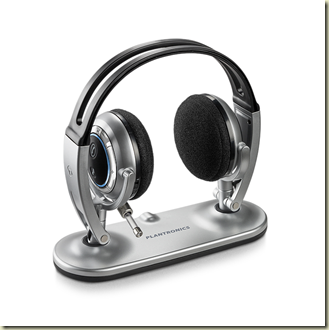
I did some research today on a good paid of Bluetooth Stereo Headsets. I chose the Plantronics Pulsar 590E for a number of reasons.
-They have excellent sound quality
-They can be used for music and telephone calls
-They fold up nicely and have a carrying case
-They have a cool looking charger base
-I will use it for my laptop for music and Skype calls, my ATT Fuze Phone for music and cell calls, and my home land line with my Bluetooth enabled VTech LS5145 Landline Phone
-It can be paired to 1 mobile phone and to 1 stereo device simultaneously (allowing you to switch back and forth between them).
posted by beanstalk66 @ 8:57 PM
0 comments

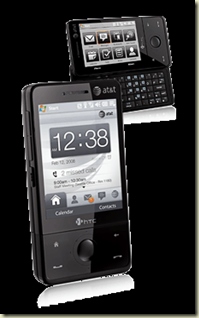
If you are a mobile professional and want to be able to get online wherever you are, this is a cheap and easy way to do it! This product, WmWiFiRouter for Windows Mobile devices is great! If you already have a Windows Mobile based phone with 3G high speed internet AND WiFi built into it (May I suggest the HTC Fuze from ATT which I just got) and are paying the $30 for Internet on your phone to primarily get your email on your phone why not extend the capabilities of that internet connection to your laptop. This will save you a load of money because you will not have to purchase the additional “tethering” service from your carrier (Usually $20-$30 additional per month on top of your current phones internet) and you will not have to purchase an additional wireless internet card for your computer from your cell phone provider (Usually $60 per month.)
I tried out this software with my laptop and my HTC Fuze and it works perfectly, giving me a good 700Mbps to 1Gbps connection, enough to browse the internet quickly and even stream shows from Hulu.com or YouTube.com
Note: This can also be done on an iPhone but is very complicated, first you have to “JailBreak” your iPhone then hack it even further to get it to work. Much easier with Windows Mobile. Not sure about Blackberry…
posted by beanstalk66 @ 12:40 PM
0 comments

For many many years I have been searching for a good video game controller for Windows. I have gone through countless controllers and none of them seemed to ever be as good as a console controller. But with the Xbox 360 Controller for Windows, everything changes. Finally, a controller worth using on my computer has been released.
And here is the best part. With the new 
I also like the fact that I can control my computer with the controller with a little free hack called XPadder. Now I can control my DVD playback, multimedia, and more from the comfort of my couch. Click here for instructions on how to do that.
posted by beanstalk66 @ 2:41 PM
0 comments

“Hanukkah is the festival of lights, instead of one day of presents, we get eight crazy nights.” Adam Sandler
In celebration of Hanukkah this year, I would like to introduce you to Erran Baron Cohen, brother of actor Sasha Baron Cohen (Ali G, Borat) with the release of their new album, Songs in the Key of Hanukkah.
Please enjoy their new video, Dreidel (Featuring Jules Brookes)

Another classic Hanukkah song, of course, is the Hanukkah song by Adam Sandler

posted by beanstalk66 @ 11:40 AM
0 comments
The $200,000 Flight into Space with Virgin Galactic

posted by beanstalk66 @ 10:38 PM
0 comments